
Turn your chord charts into playable guitar exercises.
GuitarHarmonyLab helps you understand harmony, see the right notes and create concrete exercises to progress on the guitar.
For guitarists, teachers and students.
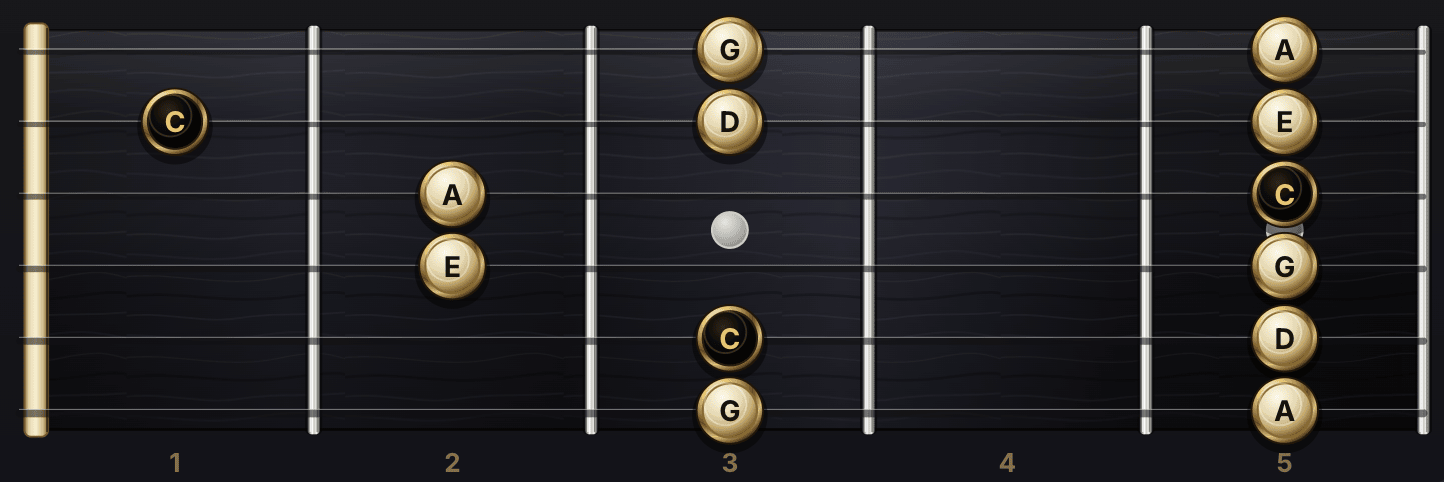
Fretboard · one playable position
Real tablature · same four notes

Behind GuitarHarmonyLab there is no anonymous AI — there is a guitarist. After 30+ years of playing, I built the tool I always wanted: real chord charts, playable fingerings, every choice checked with a guitar in hand.
Nicolas Alteirac Professional guitarist · Former I.M.F.P. student — Jazz & contemporary music · Founder of GuitarHarmonyLab
Not a video course. Not a chord dictionary. Not admin software.
Student-management tools know nothing about the guitar. Chord catalogs track no one. GuitarHarmonyLab connects the chart, the fretboard and student follow-up — in one place.
For guitarists
Stop guessing. Start hearing the harmony.
- Understand what scales work over each chord in your progression
- See chord tones and arpeggios directly on the neck — no theory guesswork
- Practice with real chord progressions from your favorite songs or styles
- Move from beginner chord tones to advanced guide tones at your own pace
- Explore Jazz, Blues, Rock, Gypsy Jazz and Rumba styles on the same grid
- Use alternative tunings without losing your harmonic bearings
For guitar teachers
Prepare, assign and track each student’s guitar practice.
- Import any chord chart and create editable Practice Cards after review
- Adapt the assignment to Beginner, Intermediate or Advanced level
- Assign a secure student practice link with no student account
- See whether the student practiced or got stuck
- Keep fretboard visuals, chord tones and guide tones in one teacher handout
- Save and reuse prepared practice across multiple lessons
From chord chart to tracked student practice
Six practical steps: import, review, choose level, generate Practice Cards, assign a no-account student link and see the student signal.
Import or type a chord chart
Upload a photo or PDF, paste a chart, or type chords manually. Manual entry stays free and every chart can be reviewed before AI.
Review the grid
Correct detected chords bar by bar. No practice plan is generated until you explicitly click the AI button.
Choose level and style
Beginner, Intermediate or Advanced. The fretboard zone, voicings, guide tones and rhythm idea adapt to the player.
Generate Practice Cards
Get editable cards with goal, first exercise, chord tones, guide tones, fretboard zone, rhythm idea and weekly assignment.
Open fretboard exercises
See playable chord tones, voicings, arpeggios and guide-tone paths on the neck, adapted to the chosen level.
Assign and track practice
Teacher Studio creates a secure student practice link, with no student account. The student simply marks whether they practiced or got stuck, and the teacher sees the latest update.
It all starts from a chart and comes back to practice
Every tool has one clear job: turn a real chord chart into useful fretboard exercises, reusable lesson material and student assignments that are easy to follow.
Chart-to-Practice Wizard
Import a chart, type it yourself or start from a demo. Review the chords, choose the level, then generate a practice plan only when you’re ready.
Chord Chart Import
Upload a photo or PDF, then edit the detected grid before any AI practice plan. Manual entry stays free.
Guided Voicings
Playable positions, short moves, realistic fingerings, guide tones and fretboard zones adapted to the student’s level.
Practice Card Generator
Short, concrete practice cards: goal, first exercise, guide tones, fretboard zone, rhythm and an assignment to practice.
Student practice link
Teacher Studio assigns a secure read-only link. Students only click I practiced or I’m stuck, and the teacher sees the signal.
Your guitar tools stay available
The interactive fretboard, Chord Finder, Harmony Wheel, Harmony View, the Editor and your projects stay accessible at any time.
From chord chart to fretboard — without the guesswork.
Choose a chord to master or explore a new harmonic route. GuitarHarmonyLab turns your chart into clear, playable decisions.
Arpeggio Lab
Pick a chord from your chart. Get a genuinely playable position, its fingering and a timed workout — so you know exactly what to practise.
Harmonic substitutions
The engine reads the progression and suggests coherent alternatives, with the musical reason behind every choice.
Assign a full week of practice in under a minute.
No student account. No app for your student to install. You turn a chord chart into editable Practice Cards, then send one secure link — your student just taps a button when they’re done.
Chord chart
Import or type a chart, review the grid bar by bar.
Assignment
Generate Practice Cards and edit them — you stay in control.
Student practice link
One secure link, no account, read-only for the student.
Student update
One tap to say I practiced or I’m stuck. You see who’s moving forward and who needs help.
€29 / month
That’s €1.45 per student each month with 20 students.
Over a year, less than what one student spends on guitar strings.
Start Teacher Studio100 AI practice plans · 30 imports · 500 saved projects every month.
Clear harmony, designed for the fretboard.
Chord charts, focused exercises and practice plans built for teachers who need reliable lesson material — and for guitarists who want to understand what they play, not just memorize shapes.
Teacher-validated fingerings
Every chord shape is played on a real guitar and signed off by a teacher for playability and finger choice — not just printed by an algorithm.
Correct harmonic spelling
Notes are named by their role in the chord, not as plain fretboard positions. A ♭7 stays a ♭7; in Eb7 you read Db, not C#. The guitarist finally understands why the note is there, not just where to put it.
No automatic AI call
The AI never runs by itself. You review the chord grid first, then generate a plan only when you choose to — every single time.
Turn your chord charts into real fretboard practice.
Whether you play it or teach it.
Understand the harmony, see it on the fretboard, and — if you teach — assign it and follow each student’s signal.
Essential Player €3.99/month · Premium Player €7.99/month · Teacher Studio €29/month · No auto AI call · Beginner → Advanced · 6/7 strings